
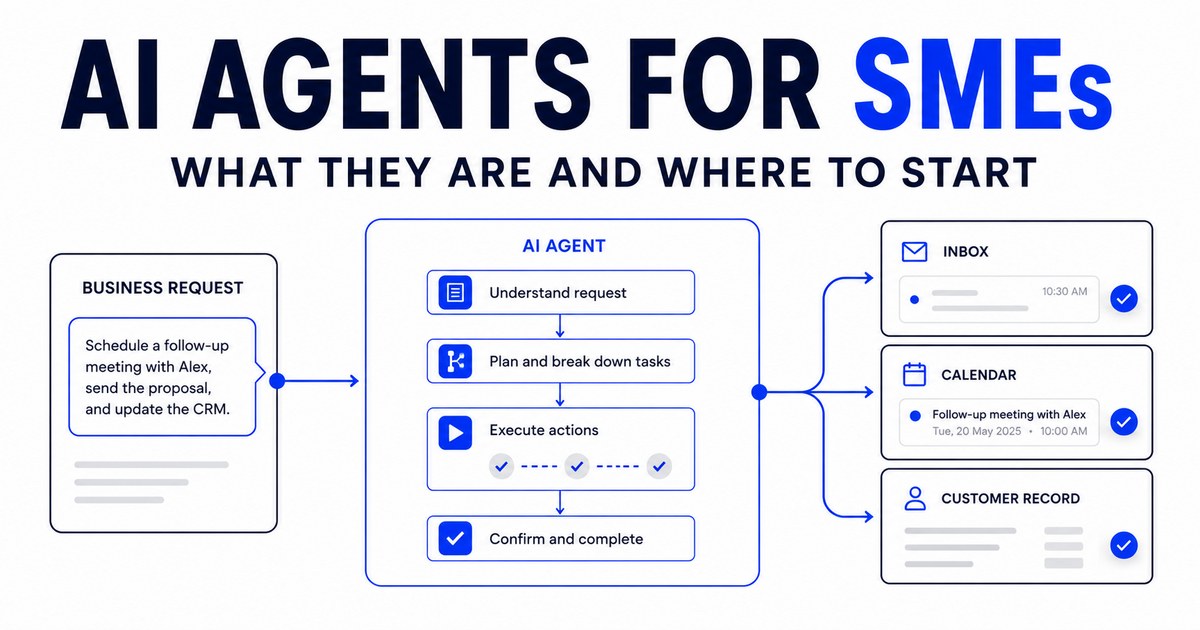
A chatbot may be called an agent. A workflow with one AI step may be called an agent. Some software companies even describe a normal product feature as an AI agent.
For a business owner, the label matters less than what the system can actually do. A useful AI agent should be able to receive information, understand what needs to happen and complete part of a business workflow.
What is an AI agent?
An AI agent is software that uses artificial intelligence to perform tasks towards a defined outcome. It may be able to:
- Read an email or enquiry
- Understand what the person is asking for
- Find relevant information
- Make a recommendation
- Create a draft
- Update a business system
- Send a message
- Schedule an appointment
- Ask a person for approval
- Record what happened
The agent does not need to resemble a person or have a name. It is better to think of it as a digital worker assigned to a narrow and clearly defined process.
AI agent versus ChatGPT
ChatGPT and similar tools are useful for individual work. An employee opens the tool, enters a prompt and receives an answer. The employee then decides what to do with that answer.
An AI agent is designed to operate as part of a repeatable workflow. A salesperson might use ChatGPT to draft a follow-up email, copying the meeting notes in, explaining the situation, reviewing the reply and sending it manually.
A follow-up agent could receive the approved meeting notes, prepare the message using the company's preferred style, send it for approval and remind the salesperson if no action is taken. The underlying AI may be similar. The workflow around it is different.
AI agent versus traditional automation
Traditional automation follows fixed instructions: if a form is submitted, add a row to a spreadsheet and send a confirmation email. This is useful when every situation should produce the same action.
An AI agent can interpret less structured information: when an enquiry is submitted, determine which service the prospect needs, identify any missing information and prepare an appropriate response.
Traditional automation is predictable but inflexible. AI agents are more adaptable but require clearer controls and testing. Many useful business workflows combine both.
AI agent versus chatbot
A chatbot communicates with a user through a conversation. An AI agent may include a chatbot, but it can also work behind the scenes without speaking directly to anyone.
A customer-facing chatbot might answer a question. An enquiry response agent could answer the question, qualify the prospect, update the CRM, notify the correct salesperson and offer available meeting times. The conversation is only one part of the workflow.
What can AI agents do for a growing business?
The best applications are usually not futuristic. They involve routine work that employees already perform every day.
1. Find potential customers
A lead generation agent can search approved public sources for companies that match a target customer profile, organising details such as company name, industry, location, website, contact information, relevant business signals and the reason each company may be a suitable prospect. A salesperson reviews the list before outreach begins.
2. Prioritise prospects
Not every potential customer deserves the same amount of attention. An AI agent can rank prospects using agreed criteria such as industry, company size, location, contactability and fit with the business's services. This gives the salesperson a place to start. It should not prevent them from applying their own judgement.
3. Respond to enquiries
An enquiry response agent can monitor a website form or shared inbox. When a message arrives, it can:
- Identify what the prospect needs
- Answer approved questions
- Collect missing information
- Assign the enquiry
- Alert a salesperson
- Offer a suitable next step
Sensitive, unclear or high-value enquiries can be escalated to a person.
4. Prioritise inbound leads
An inbound lead may look promising while lacking the budget, urgency or authority to proceed. An AI agent can assess available information and recommend which leads need immediate attention. The scoring process should be based on criteria the business understands and can change.
5. Prepare for meetings
A meeting preparation agent can gather information from the company website, earlier conversations, customer records and other approved sources. It can produce a short briefing covering what the prospect's company does, who is attending, previous interactions, likely priorities, relevant questions, suitable services to discuss and open actions from previous meetings.
6. Schedule appointments
A scheduling agent can compare availability, suggest time slots, create calendar invitations and send reminders. It can also manage rescheduling without creating a long email exchange.
7. Record and organise meeting notes
An AI scribe can convert a transcript or recording into a structured summary, identifying customer needs, questions, objections, commitments, decisions, next steps, owners and deadlines. A participant should review the summary before it becomes part of the official customer record.
8. Manage sales follow-up
A follow-up agent can prepare messages using the context of the actual conversation, remind the salesperson when action is due and flag opportunities that have gone quiet. For important opportunities, the agent can draft the message while leaving the final approval to the salesperson.
9. Reconnect with old prospects
Many companies have old leads sitting in a spreadsheet or CRM. An AI agent can review these records, identify contacts who may be worth revisiting and prepare a message based on the earlier conversation. This allows the business to make better use of relationships it has already developed.
10. Support customer onboarding and renewal
AI agents can also help after a sale. An onboarding agent may send the welcome sequence, collect required information and remind the customer about missing items. A renewal agent may identify approaching contract dates, prepare an account summary and remind the responsible employee to contact the customer. The agent supports the process. A person remains responsible for the relationship.
How does an AI agent work?
Most business agents require five components.
1. A trigger
Something starts the workflow: a new enquiry, an upcoming meeting, a completed call or a contract approaching its renewal date.
2. Business context
The agent needs appropriate information to perform the task. This may include product information, qualification criteria, customer records, writing guidelines or previous conversations.
3. Instructions
The agent needs to know what to do, what not to do and when to ask for help.
4. Connections
The agent may need controlled access to email, calendars, spreadsheets, a CRM or another business system.
5. Human oversight
A person needs to own the workflow, review important outputs and manage exceptions.
Without these five parts, an AI agent may remain an impressive demonstration rather than a reliable business process.
Do AI agents require a new platform?
Not necessarily. A business may already have email, calendars, spreadsheets, messaging channels and a CRM. Replacing all of them creates cost and disruption.
In many cases, the more practical approach is to connect an AI agent to the tools employees already use. The employee continues working in a familiar environment, and the agent handles defined steps behind the scenes. Whether this is possible depends on the existing tools and the access they provide.
What should a business automate first?
Do not begin with the most ambitious idea. Begin with the task that has the clearest business case. A suitable first workflow usually:
- Happens frequently
- Follows a recognisable pattern
- Takes meaningful employee time
- Uses information the company can access
- Produces an output a person can review
- Has a measurable result
- Does not create irreversible harm if something goes wrong
Meeting preparation, scheduling, call summaries and follow-up drafting are often safer starting points than allowing an agent to negotiate prices or make final customer decisions.
What should remain with people?
AI agents are not equally suitable for every task. People should remain closely involved where the work requires:
- Relationship-building
- Empathy
- Sensitive communication
- Negotiation
- Legal or financial judgement
- Unusual exceptions
- Final approval of important decisions
The objective is not to automate the human parts of a business. It is to reduce the manual work surrounding them.
How much does an AI agent cost in Singapore?
The cost depends on what the agent needs to do. Common cost components include initial design and setup, connections to existing systems, AI model usage, messaging or software usage, security requirements, testing, ongoing monitoring and maintenance when the business process changes.
A simple internal agent operating on one information source will usually be easier to implement than a customer-facing agent connected to several systems. When comparing proposals, ask vendors to separate:
- One-time setup costs
- Monthly support fees
- AI and software usage charges
- Costs for additional integrations
- Charges for future changes
This makes it easier to understand the actual long-term cost.
What are the risks?
AI agents can make mistakes. They may misunderstand a request, use outdated information or prepare an unsuitable response. This is why the workflow should include defined limits and human escalation.
Businesses should also consider personal data. Singapore's Personal Data Protection Commission has published guidelines on using personal data in AI systems. Before connecting an agent to customer or employee records, a business should understand what data is being used, where it is processed and how it is protected.
Other practical safeguards include:
- Limiting the agent's system access
- Using approved information sources
- Requiring approval for important actions
- Keeping activity records
- Testing unusual situations
- Giving users a way to reach a person
- Reviewing the agent regularly
How to start an AI agent project
Step 1: Choose one problem
Identify a repetitive task that is affecting sales, service or operational capacity.
Step 2: Map the current workflow
Write down what happens today, who performs each step and which tools are involved.
Step 3: Define the outcome
Decide what success means. This might be faster response times, fewer administrative hours or more consistent follow-up.
Step 4: Set the boundaries
Specify what the agent may do automatically and which actions require approval.
Step 5: Test with real examples
Use a controlled set of previous enquiries, meetings or customer records.
Step 6: Run a limited pilot
Introduce the agent to a small group of users before expanding it across the business.
Step 7: Measure the result
Compare the new workflow against the original process. Continue only if it produces a meaningful improvement.
SimplePlainAI builds practical AI agents for sales and operations teams. Explore our AI agents for sales and operations, or tell us which task is slowing your team down.
Book a discovery call