
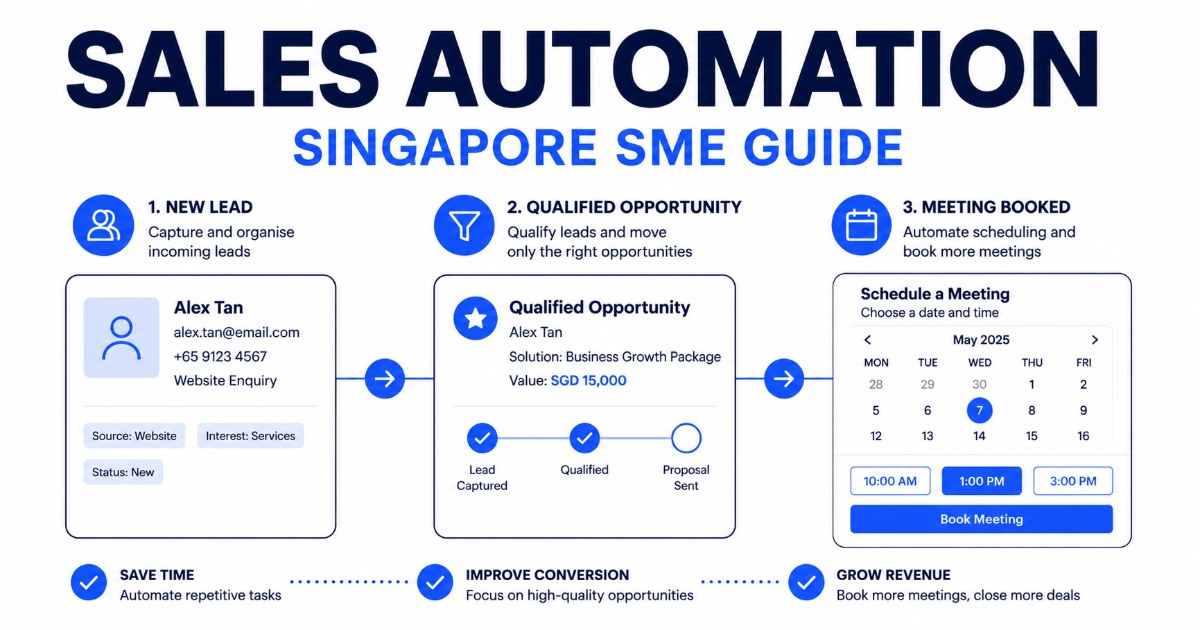
Leads need to be researched. Enquiries need to be sorted. Meetings need to be scheduled. Notes need to be entered into the CRM. Prospects need to be reminded, sometimes more than once.
None of these tasks is particularly difficult. Together, they consume a surprising amount of time. This is where sales automation can help.
AI adoption among Singapore SMEs increased from 4.2% in 2023 to 14.5% in 2024, according to IMDA's Singapore Digital Economy Report. However, buying another AI subscription is not the same as improving a sales process.
The useful question is not, which AI tool should we buy? It is, which parts of our sales process should no longer require someone to do them manually?
What is sales automation?
Sales automation means using software to complete repetitive parts of the sales process.
Traditional automation follows fixed rules. A CRM may send the same reminder email three days after a proposal is issued.
AI sales automation can handle tasks that require some interpretation. It can read an enquiry, identify what the prospect needs, draft an appropriate response and decide which salesperson should receive it.
A good automation does not replace the salesperson. It removes the administrative work around the salesperson. Here are nine practical places to start.
1. Finding and researching prospects
A salesperson may spend hours searching company websites, LinkedIn and business directories before sending a single message. An AI prospecting workflow can:
- Find companies that match an ideal customer profile
- Collect publicly available company information
- Identify likely decision-makers
- Summarise why each company may be relevant
- Prepare the information in a consistent format
The salesperson still decides who to contact. The difference is that they begin with a researched list instead of a blank spreadsheet.
2. Enriching incomplete lead information
Leads often enter a CRM with little more than a name and email address. Automation can fill in useful context such as the company, industry, location, team size and likely business needs, and standardise how information is entered.
This makes it easier to prioritise leads and prevents salespeople from repeating the same research.
3. Responding to new enquiries
A prospect who submits an enquiry usually expects a quick response. An AI enquiry response agent can read the message, identify the request and provide an immediate first reply. It can answer common questions, collect missing information or direct the prospect to the right next step.
Complex or sensitive enquiries can still be handed to a person. The goal is not to remove people from the conversation. It is to make sure a good lead is not left waiting because the team is busy, asleep or attending an event.
4. Qualifying and prioritising leads
Not every enquiry deserves the same level of attention. An AI workflow can assess a lead using criteria such as:
- Company size
- Location
- Budget
- Business need
- Purchase timeline
- Fit with the company's services
- Urgency of the enquiry
The highest-priority opportunities can be sent to the sales team immediately. Lower-priority leads can enter a longer nurturing process. The scoring criteria should be visible and adjustable, so salespeople can understand why a lead received its priority.
5. Preparing for sales meetings
Before a meeting, a salesperson may need to review old emails, visit the prospect's website, check LinkedIn and search the CRM. A meeting preparation agent can combine this into a short briefing covering:
- What the company does
- The prospect's role
- Previous conversations
- Likely priorities
- Relevant news or developments
- Questions worth asking
- Suitable products or case studies to discuss
This does not guarantee a good meeting. It gives the salesperson more time to think about the meeting.
6. Scheduling meetings
Scheduling should be simple. It often turns into several rounds of messages. Automation can offer available times, account for the salesperson's calendar, send the invitation and issue reminders. If a prospect needs to reschedule, the same workflow can manage that without creating another email thread.
7. Recording meeting notes
Salespeople often take rough notes during a call and promise themselves they will update the CRM later. Sometimes they do. Sometimes the next meeting starts.
A meeting scribe can produce a structured summary containing the prospect's current situation, problems discussed, requirements, objections, decisions, agreed next steps and follow-up dates. A person should review the notes before they become part of the official customer record.
8. Following up consistently
Many opportunities are lost because follow-up happens too late or not at all. AI can draft follow-up messages using the context of the actual conversation, remind the salesperson when an action is due and flag prospects who have gone quiet.
For routine situations, the follow-up can be sent automatically. For large or sensitive opportunities, the salesperson can approve it first.
9. Reconnecting with old leads
Most businesses have old prospects sitting in spreadsheets, inboxes or CRM records. Some were not ready to buy at the time. Others stopped replying. A few may have changed jobs or developed a new need.
An AI reactivation workflow can review old records, identify promising contacts and prepare a relevant message based on the previous conversation. This is often a better starting point than contacting a completely cold list.
Which sales task should you automate first?
Do not begin by trying to automate the whole sales department. Choose a workflow with four characteristics:
- It happens frequently
- It follows a reasonably consistent process
- It takes meaningful time
- A mistake can be reviewed or reversed
Good first projects include meeting preparation, enquiry routing, follow-up drafting and CRM note entry. These produce visible improvements without asking the team to surrender control of an important customer decision.
Common sales automation mistakes
Automating a broken process
If nobody agrees on what makes a lead qualified, an AI system will not solve the disagreement. It will simply apply unclear rules more quickly. Document the process before automating it.
Buying tools without connecting them
A chatbot, CRM and email platform may each work well on their own. If information cannot move between them, the team still has to copy and paste everything. The workflow matters more than the number of tools.
Removing human review too early
Start with AI preparing the work and a person approving it. Increase automation only after the output is consistent.
Measuring activity instead of results
Sending more emails is not automatically an improvement. Track outcomes such as response time, meetings booked, lead-to-meeting conversion, time spent on administration, follow-ups completed on time and opportunities recovered.
A simple 30-day implementation plan
Week 1: Map the current process
Choose one sales workflow and write down every step. Record who performs it, which systems they use and where delays occur.
Week 2: Build a small pilot
Create the workflow using a limited set of real examples. Keep human approval in place.
Week 3: Test edge cases
Test unclear enquiries, missing information, unusual customer requests and situations that should be escalated.
Week 4: Measure and improve
Compare the new process against the old one. Check whether it saves time, improves response speed or helps the team convert more opportunities. If it works, expand it. If it does not, fix the workflow before adding more automation.
SimplePlainAI builds practical AI agents for sales and operations teams. Explore our AI agents for sales and operations, or tell us which task is slowing your team down.
Book a discovery call